Yes2Win Withdraw Teaching Guide

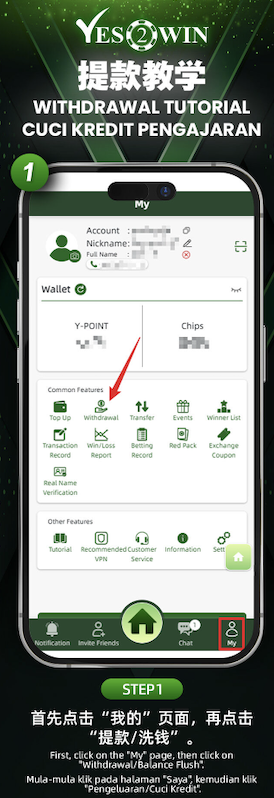
Step 1: Access the Withdrawal Section
Start by navigating to the "My" section at the bottom-right of the homepage. Once on your profile dashboard, click the "Withdraw" icon under the Common Features section to proceed.
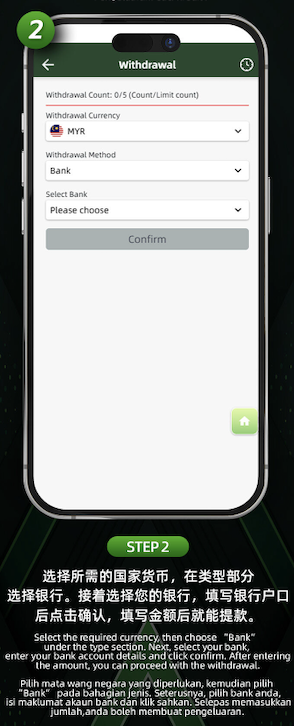
Step 2: Select Currency and Withdrawal Method
Choose your withdrawal currency (e.g., MYR). Then, under "Withdrawal Method", select "Bank". After that, choose your preferred bank from the dropdown menu and enter your banking details accurately.
Step 3: Confirm and Proceed
Once all required information is entered correctly, click "Confirm" to submit your withdrawal request. The platform will process your transaction shortly.
Double-check your bank details
Ensure that your bank account number and selected bank match to avoid transaction errors.
Monitor processing time
Withdrawal processing may vary slightly based on transaction volume and banking systems. Check your account balance to confirm successful withdrawal.
Start Withdrawing on Yes2Win Now
Ready to withdraw your Yes2Win winnings? Follow the tutorial and cash out easily with your selected bank.